
On This Page
Quick Answer: What Trading Platforms Does Exness Offer?
Exness offers several trading platforms including MetaTrader 4, MetaTrader 5, Exness Terminal, MetaTrader WebTerminal, and the Exness Trade App.
In the sections below, I will review each Exness trading platform from a trader’s perspective so you can understand how MT4, MT5, Exness Terminal, WebTerminal, and the Exness Trade App work in real trading conditions, what each platform is best for, and which one may fit your trading style.
What Are Exness Trading Platforms?
Exness trading platforms are the software and web-based tools traders use to open, close, manage, and analyze trades through an Exness trading account.
A trading platform is different from the broker itself. Exness is the broker, while MT4, MT5, Exness Terminal, and the Exness Trade App are platforms or applications that allow you to access the market through your Exness account.
In simple terms:
Exness = broker
MT4 / MT5 / Terminal / App = trading platforms
Personal Area = account management dashboard
Through Exness trading platforms, users can usually:
- Open and close trades
- View live price charts
- Use technical indicators
- Manage pending orders
- Monitor balance, equity, and margin
- Trade forex, metals, indices, energies, stocks, or crypto CFDs depending on account type, region, and platform availability
- Access accounts on desktop, mobile, or web
However, not every platform works the same way. Some are better for technical analysis, some are better for mobile account management, and some are better for fast browser-based trading.
Exness MT4 Review
From a trader’s perspective, Exness MT4 is still one of the most practical platforms if your main focus is forex trading. The interface is not the most modern, but that is also why many traders like it. Everything is simple, familiar, and easy to control.
When I use MT4, the biggest advantage is speed and simplicity. I can open charts quickly, add indicators, place market orders, set pending orders, and monitor trades without feeling overloaded by too many functions. For traders who mainly trade forex pairs like EUR/USD, GBP/USD, USD/JPY, or gold, MT4 is usually enough.
Another reason MT4 remains popular is the Expert Advisor ecosystem. Many trading robots, custom indicators, scripts, and templates are still built for MT4. If you already have an EA strategy or a custom MT4 indicator, using Exness MT4 is often more convenient than switching to MT5.
However, MT4 does feel outdated compared with MT5. The number of timeframes is more limited, the interface is older, and the platform is not as flexible for multi-asset trading. For manual traders who only need basic charting and order execution, this is not a big problem. But if you want more advanced market analysis, MT5 may feel more complete.
In my opinion, Exness MT4 is best for traders who want a stable, simple, and familiar trading platform, especially those who focus on forex, scalping, technical analysis, or automated trading with MT4 Expert Advisors.
My Trader Verdict on Exness MT4
Exness MT4 is not the newest platform, but it is reliable, lightweight, and easy to use. I would choose MT4 if I already have MT4-based tools, indicators, or robots. For beginners who want a simple forex trading experience, MT4 is still a strong option.
Best for: forex traders, EA users, scalpers, and traders who prefer a classic trading interface.
Exness describes MetaTrader 4 as a well-known platform for traders of different experience levels, with tools such as flexible trading systems, algorithmic trading, mobile trading, charts, Expert Advisors, trading signals, technical indicators, news, and alerts.
MT4 is not owned by Exness. It is a third-party trading platform developed by MetaQuotes. Exness provides trading accounts and servers that allow traders to connect their Exness account to MT4.
Need help getting started with MT4? Follow our Exness MT4 download guide for step-by-step installation instructions.
Exness MT5 Review
Exness MT5 feels more modern and more complete than MT4. If MT4 is built mainly around classic forex trading, MT5 is better for traders who want more analytical tools, more timeframes, and a broader trading environment.
As an experienced trader, I find MT5 more useful when I want to analyze the market in detail. The extra timeframes help a lot. For example, instead of being limited to the common MT4 timeframes, MT5 gives more flexibility for traders who want to check price action between major timeframes.
The built-in Economic Calendar is also useful, especially for traders who follow news events such as CPI, NFP, interest rate decisions, or central bank speeches. On MT4, you usually need to check an external calendar. On MT5, this information is more integrated into the platform.
MT5 also gives a cleaner experience for multi-asset trading. If you trade not only forex but also metals, indices, energies, stocks CFDs, or crypto CFDs, MT5 usually feels more suitable. The platform structure is more advanced and better prepared for different asset classes.
That said, MT5 is not automatically better for everyone. If you already use MT4 indicators or Expert Advisors, you cannot simply move everything to MT5 without checking compatibility. MT4 uses MQL4, while MT5 uses MQL5, so many tools need to be rebuilt or replaced.
In my opinion, Exness MT5 is the better long-term platform for traders who are starting fresh or want deeper analysis. It is more powerful than MT4, but it may take a little more time to get used to.
My Trader Verdict on Exness MT5
Exness MT5 is my preferred choice if I want more charting tools, more timeframes, and a more modern trading setup. It is especially useful for traders who do manual analysis, trade multiple markets, or want a platform that feels more future-ready than MT4.
Best for: advanced traders, multi-asset traders, technical analysts, and users who want more tools than MT4.
Ready to use MT5? Follow our step-by-step guide to download and install Exness MT5 on your device.
Exness Terminal Review
Exness Terminal is different from MT4 and MT5 because it is designed for web-based trading. You do not need to download software, install anything, or set up MetaTrader manually. You can simply log in through your browser and start trading.
From a practical trading point of view, Exness Terminal is very convenient when I want quick access to the market. For example, if I am using a different computer or do not want to install MT4 or MT5, the terminal is a simple solution.
The interface is cleaner than MetaTrader. Beginners may find it easier because there are fewer complicated menus. You can open charts, choose instruments, place orders, and manage positions in a more straightforward environment.
However, Exness Terminal is not a full replacement for MT4 or MT5 if you are an advanced trader. If your strategy depends on custom indicators, Expert Advisors, scripts, or complex chart templates, MT4 or MT5 desktop is still better. Exness Terminal is more suitable for manual trading than automated trading.
In real trading, I see Exness Terminal as a useful backup platform. It is good when I need to check the market quickly, manage an open position, or place a trade without opening desktop software. But for deep analysis, I would still prefer MT4 or MT5.
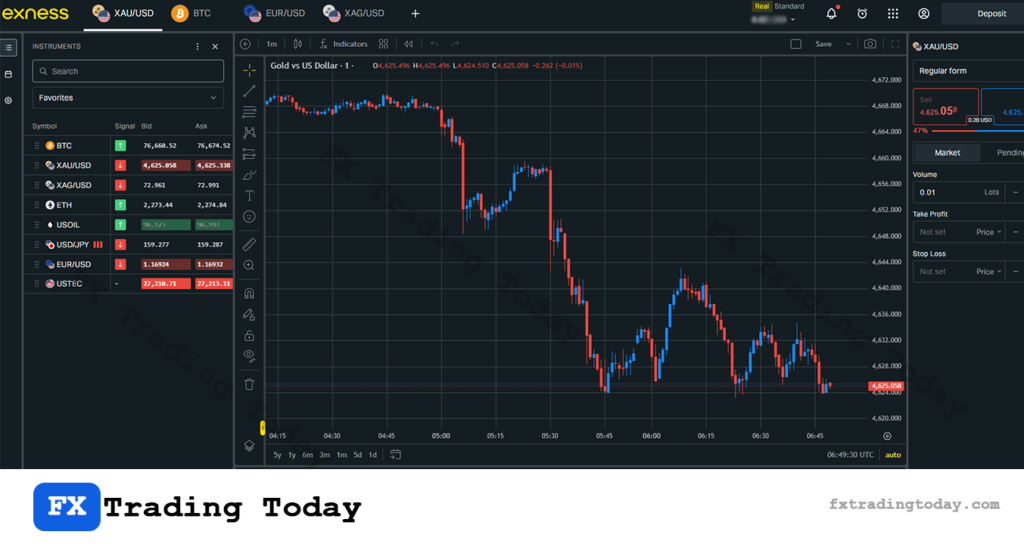
My Trader Verdict on Exness Terminal
Exness Terminal is simple, fast, and convenient. It is not the most advanced platform, but it does its job well for browser-based manual trading. I would use it as a quick-access trading tool, especially when I do not want to install MetaTrader.
Best for: beginners, browser-based traders, manual traders, and users who want quick access without downloading software.
Exness Trade App Review
The Exness Trade App is useful because it combines trading and account management in one mobile app. This is different from the MT4 or MT5 mobile apps, which are mainly focused on trading.
As a trader, I find the Exness Trade App most useful for mobile account control. You can check your balance, view account details, monitor trades, deposit funds, withdraw funds, and manage accounts directly from your phone. This makes it very practical for traders who do not always sit in front of a desktop.
For quick mobile trading, the app is convenient. You can check price movements, open trades, close positions, and monitor your account when you are away from your computer. This is especially useful if you need to react to market movement quickly.
However, I would not use a mobile app as my main platform for serious technical analysis. The screen is smaller, charting is more limited compared with desktop platforms, and it is easier to make mistakes when trading during volatile market conditions. For detailed analysis, I still prefer MT4 or MT5 desktop.
Another important point is that the Exness Trade App is more suitable for MT5-based trading accounts. If you use an MT4 account, you may need to trade through the MT4 mobile app instead.
In my opinion, the Exness Trade App is best used as a mobile management and monitoring tool, not as a complete replacement for desktop trading.
My Trader Verdict on Exness Trade App
The Exness Trade App is convenient, especially for deposits, withdrawals, account management, and checking trades on mobile. I would use it together with MT5 or desktop MetaTrader, rather than relying on it as my only trading platform.
Best for: mobile traders, account management, quick monitoring, deposits, withdrawals, and MT5 account users.
Need to install the Exness Trade App? Follow our step-by-step guides to download it on Android or iPhone.
👉 Read our Exness Android download guide.
👉 Read our Exness iOS download guide.
MetaTrader WebTerminal Review
MetaTrader WebTerminal is a good option if you want the MetaTrader experience but do not want to install the desktop version. It runs directly in your browser, which makes it useful when you are using a temporary device or cannot download software.
From a trader’s perspective, the main benefit is convenience. You can log in, access charts, place trades, and manage positions without installing MT4 or MT5. This is useful if you travel often, use multiple devices, or need quick access from a browser.
However, I do not see WebTerminal as strong as the desktop version. Desktop MT4 and MT5 are still better for serious technical analysis, custom tools, Expert Advisors, templates, and long trading sessions.
MetaTrader WebTerminal is best for basic trading actions. If I only need to check a chart, close a position, or place a simple order, it works well. But if I want to analyze multiple charts, use custom indicators, or manage an automated strategy, I would still use desktop MetaTrader.
My Trader Verdict on MetaTrader WebTerminal
MetaTrader WebTerminal is convenient but limited. It is good as a backup or browser-based option, but not my first choice for full-time trading.
Best for: traders who want browser access to MT4 or MT5 without installing software.
Trader Comparison: Which Exness Platform Feels Best in Real Use?
| Platform | Trader Experience | Best For | Device | Main Strength | Main Weakness | Automated Trading |
|---|---|---|---|---|---|---|
| Exness MT4 | Simple, familiar, lightweight | Forex trading, EAs, custom indicators | Desktop, Web, Mobile | Simple, popular, strong EA ecosystem | Older interface, fewer tools | Yes, through Expert Advisors |
| Exness MT5 | More modern and analytical | Advanced analysis, multi-asset trading | Desktop, Web, Mobile | More timeframes, indicators, tools, Economic Calendar | MT4 tools are not directly compatible | Yes, through MQL5 |
| Exness Terminal | Fast and clean browser trading | Quick manual trading without download | Web browser | No installation, clean interface | Not ideal for advanced tools or EAs | Not ideal for EAs |
| Exness Trade App | Convenient mobile account control | Mobile trading and account management | iOS / Android | Trading, deposits, withdrawals, and account management | Not ideal for deep chart analysis | Not for complex EA trading |
| MetaTrader WebTerminal | MetaTrader access in browser | Backup trading without installation | Web browser | MT4/MT5 access without installation | Less powerful than desktop MetaTrader | Limited compared with desktop |
My Final Trader Opinion
If I had to choose one platform as my main setup, I would choose Exness MT5 because it offers more tools, more timeframes, and a better long-term trading environment.
For traders who want more advanced tools and multi-asset trading, read our full tutorial on how to connect your Exness account to MT5.
However, the best platform depends on your trading style:
• Use Exness MT4 if you rely on MT4 indicators, robots, or classic forex trading.
• Use Exness MT5 if you want advanced analysis and a more modern platform.
• Use Exness Terminal if you want fast browser-based manual trading.
• Use Exness Trade App if you want to manage your account and trades from mobile.
• Use MetaTrader WebTerminal if you need MetaTrader access without installation.
Which Exness Trading Platform Should You Choose?
Choose Exness MT4 If You Want Classic Forex Trading
MT4 may be the better choice if you:
- Already know how to use MetaTrader 4
- Trade mainly forex
- Use MT4 Expert Advisors
- Use custom MT4 indicators
- Prefer a simple and familiar layout
- Do not need MT5’s extra tools
MT4 is a practical choice for traders who want stability, simplicity, and access to a large ecosystem of forex tools.
If you prefer classic forex trading, follow our step-by-step guide on how to connect your Exness account to MT4 before placing your first trade
Choose Exness MT5 If You Want More Advanced Tools
MT5 may be better if you:
- Want more timeframes
- Need more built-in indicators
- Use fundamental analysis
- Want a built-in Economic Calendar
- Trade multiple asset classes
- Are starting fresh and do not rely on MT4-only tools
MT5 is generally the stronger long-term choice for traders who want a more modern platform.
Choose Exness Terminal If You Want Browser-Based Trading
Exness Terminal may be better if you:
- Do not want to install software
- Prefer trading from a browser
- Want a cleaner interface
- Mainly trade manually
- Need fast access from different devices
- Do not rely on Expert Advisors
It is useful for traders who want convenience and simplicity.
Choose the Exness Trade App If You Trade on Mobile
The Exness Trade App may be better if you:
- Trade from your phone
- Want to manage your Exness account on mobile
- Need deposit and withdrawal access from the app
- Want to create or manage accounts quickly
- Use MT5-compatible Exness accounts
- Prefer an all-in-one mobile experience
For mobile-first traders, the Exness Trade App is one of the most convenient options.